
This article was originally written in Chinese and translated into English by AI.
Preface
While working on a sound-processing project, I became curious about audio digitization and its basic principles. Online explanations were scattered and poorly formatted, so I decided to write an article that brings the fundamentals of digital audio together.
This is a general-audience introduction covering how sound works, audio-file properties, and audio formats. Estimated reading time: 10 minutes.
1. What Is Sound?
From middle-school physics, we know that sound is a wave produced by a vibrating object. It travels through a medium such as air, a solid, or a liquid and enters the ear, causing the ossicles to vibrate. After a series of neural signals, it is perceived as sound.
Sound is a wave. When an object vibrates, it creates alternating regions of compression and rarefaction in a medium such as air, forming a longitudinal wave.
Because sound is a wave, we can represent it graphically.
At a particular point in space, changes in air density over time look like this:
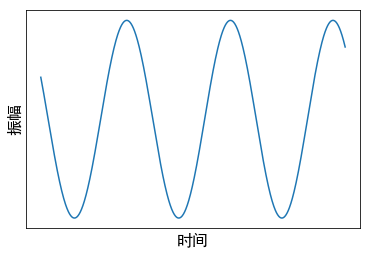
The image below shows a sine wave with a period of 0.002 seconds and a frequency of 500 Hz.
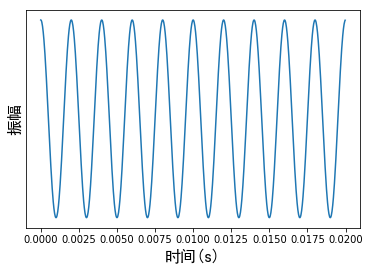
The corresponding sound is shown below. It resembles the censor tone used in videos.
Frequency (pitch): the number of periodic cycles a sound completes in one second
The human hearing range is approximately 20 Hz to 20 kHz. Low-frequency sounds are deep and heavy, while high-frequency sounds are sharp and piercing. Sounds above 20 kHz are ultrasonic.
The next two audio samples are sine waves at 100 Hz and 5,000 Hz respectively.
Amplitude (loudness): the magnitude of a sound
We sometimes describe loudness in decibels (dB). It is worth noting that a decibel expresses a ratio as a numerical value; it has no physical unit of its own. It is ten times the logarithm of a power-intensity ratio.
| 1 decibel | A barely audible sound |
| Below 15 decibels | Feels quiet |
| 30 decibels | A whisper |
| 40 decibels | The hum of a refrigerator |
| 60 decibels | A normal conversation |
| 70 decibels | Walking through a busy commercial district |
| 85 decibels | A road with passing cars |
| 95 decibels | A motorcycle starting |
| 100 decibels | An electric drill during renovation |
| 110 decibels | Karaoke or loudly played music |
| 120 decibels | An airplane taking off |
| 150 decibels | Fireworks and firecrackers |
2. Capturing and Storing Sound
Sampling is the process of converting a continuous quantity in time or space into discrete values.
To sample sound, a device such as a microphone commonly converts the sound signal into an electrical signal. An analog-to-digital converter then turns the electrical signal into a sequence of binary digits represented by ones and zeros—a digital signal.
We sample a sound tens of thousands of times per second, obtaining tens of thousands of binary numbers arranged chronologically. In this way, continuously changing sound becomes binary data that a computer can store and recognize.
Here is the Windows 10 shutdown sound:
This sound consists of 84,700 different numbers. A portion of them is shown below, with the binary values converted to decimal:
… 413, 263, 137, 15, -124, -253, -369, -463, -511, -545, -587, -632, -678, -701, -687, -659, -623, -579, -539, -473, -380, -282, -162, -35, 78, 211, 341, 430, 499, 548, 551, …
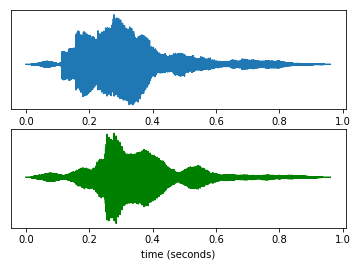
If we represent the audio graphically, it looks like the image below. The horizontal axis is time and the vertical axis is amplitude; the two plots represent the left and right channels. Because the sound frequencies are high, the signals do not appear as individual sine waves at this scale and instead look solid.
2.1 Sampling Rate
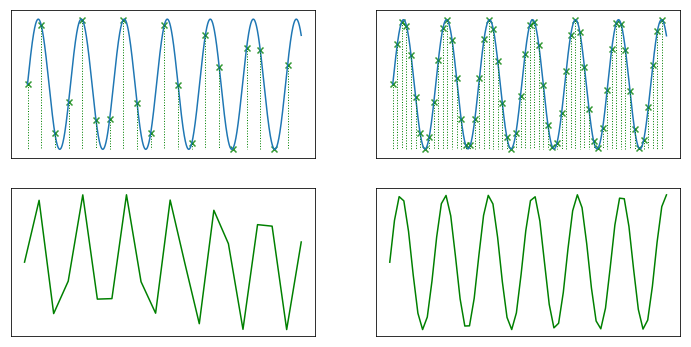
The sampling rate is the number of times a recording device samples a sound signal each second. The higher the sampling rate, the more faithfully and naturally the sound can be reproduced.
Common sampling rates include 22.05 kHz, 44.1 kHz, and 48 kHz.
22.05 kHz provides sound quality comparable to FM radio, 44.1 kHz is the theoretical quality of a CD, and 48 kHz is described here as the highest sampling rate distinguishable by human hearing.
For an intuitive explanation, consider the continuous sound below:
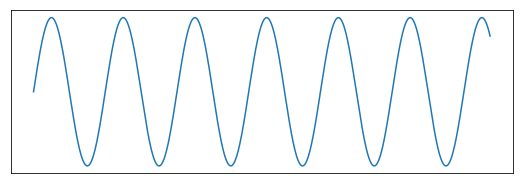
We sample it at equal time intervals:
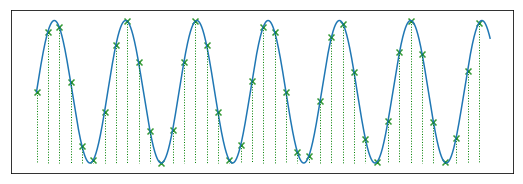
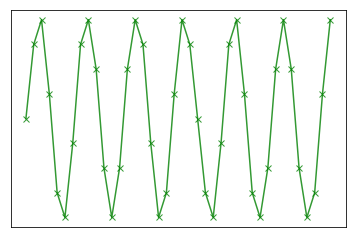
The audio samples we actually obtain are as follows:
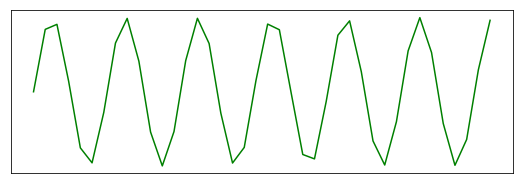
As the image below shows, a higher sampling rate produces better sound quality.
2.2 Bit Depth
We cannot measure a sound’s intensity at every instant, so we sample it discretely at equal time intervals. The sampled data also cannot be infinitely precise: a value such as 63.2222222... cannot be stored with unlimited precision in a computer. The possible sample values must therefore be discrete as well.
Bit depth is another audio-file parameter. A higher bit depth produces higher-quality sound. Common bit depths include 8, 16, and 32 bits.
The bit depth is the number of binary digits used to store each sampled value. An 8-bit depth means that eight binary digits are used, as in 00010111.
Return to our sine-wave example and suppose the bit depth is three. The stored data can then take only eight possible values: 000, 001, 010, 011, 100, 101, 110, or 111.
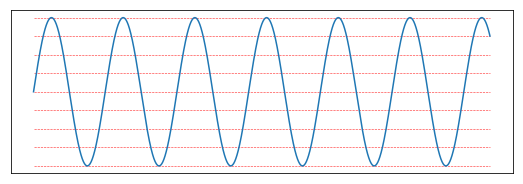
We continue sampling at equal intervals, but each sampled point can fall only on the nearest red line.
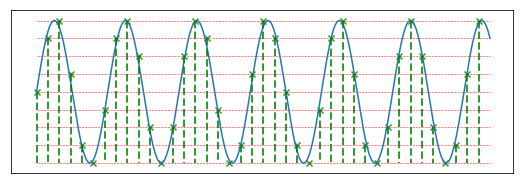
The vertical coordinate of each point can now take only 2³, or eight, possible values.
As the image below shows, a greater bit depth produces better sound.
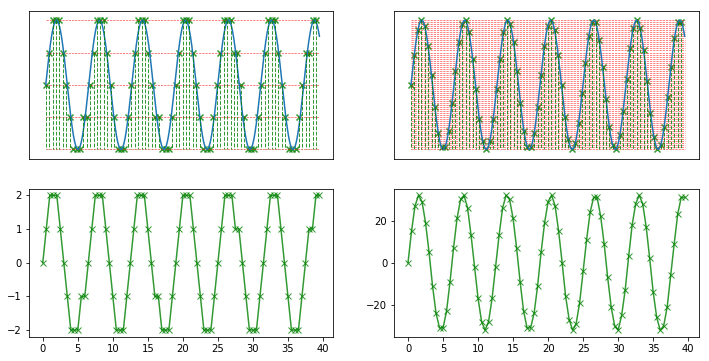
It is also important to note that values stored at different bit depths cannot be compared directly.
For example, the 4-bit value 1111 equals 15 in decimal, while the article’s example gives the 8-bit value 10000000 as 64 in decimal. The latter does not represent a louder sound merely because 64 is greater than 15. Each value should first be divided by the full range available at its respective bit depth before the two are compared.

The first value represents the louder sound.
2.3 Number of Channels
Audio can be monaural or stereo.
With monaural audio, the left and right ears hear the same sound.
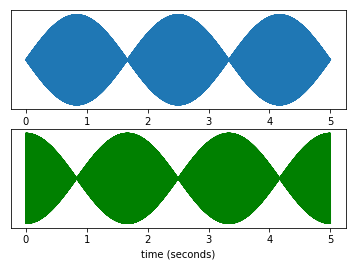
With stereo audio, the two ears receive different information. For audio of the same duration, sampling rate, and bit rate, a stereo file requires twice as much storage as a mono file. In return, it creates a sense of space. Games and films commonly use stereo so that listeners can identify a sound’s direction.
An example is shown below:
3. Audio Formats
Common audio formats include WAV, MP3, and AAC.
3.1 WAV
WAV is an audio format developed by Microsoft. It supports compressed audio but is commonly used to store uncompressed, lossless audio. Because the data is uncompressed, files are often large and the format is frequently used for short sound clips.
3.2 MP3
MP3 uses lossy compression to reduce the amount of audio data significantly. It can compress an audio file to one-tenth or even one-twelfth of its original size without an obvious loss of sound quality.
3.3 AAC
Compared with MP3, AAC offers better sound quality and smaller files. It can compress audio to one-eighteenth of its original size.
3.4 Other Formats
- APE: lossless compression that can reduce a file to approximately half its original size
- FLAC: lossless compression